Key Takeaways
- Dynamic Ergonomics: Alternating between sitting and standing every 30 to 45 minutes reduces spinal pressure, boosts metabolic rate, and prevents daytime fatigue.
- Hybrid Work Essential: Modern remote and split-office routines demand versatile furniture that transitions effortlessly between intense focus tasks and collaborative video calls.
- Motorized Precision: Dual-motor height-adjustable frames offer smooth height transitions and digital memory presets for individual height requirements.
- Climate-Smart Table Tops: High-density engineered wood and solid timber tops with sealed protective edges withstand humidity shifts across Indian urban environments.
Adjustable Office Tables: Perfect for Hybrid Work Culture
The shift toward flexible working has fundamentally changed how we design our workspaces. As companies across India adopt split schedules—combining work-from-home flexibility with dedicated office days—the demand for adaptable, ergonomic furniture has surged. Spending 8 to 10 hours slouched over a static dining table or rigid office desk leads to posture breakdown, neck strain, and decreased cognitive output.
Integrating adjustable office tables into your workspace solves this sedentary challenge. Height-adjustable desks allow you to transition smoothly between sitting and standing throughout your workday. This simple movement keeps your spine aligned, improves circulation, and sustains energy levels during long working hours.
In this comprehensive guide, we examine how sit-stand tables support hybrid working routines, explore motor technology, and share tips for setting up an ergonomic desk at home.
1. The Ergonomic Impact: Why Static Desk Setup Fails Hybrid Workers
Prolonged static sitting poses significant risks to physical health and daily productivity. According to a systematic review published by Cochrane, introducing sit-stand desk interventions in workplace environments reduces daily sitting time by approximately 84 to 116 minutes.
Changing your posture throughout the day distributes spinal load more evenly and prevents localized muscle fatigue.
Physical and Health Benefits of Standing Workstations:
- Reduces Lower Back Strain: Alternating between sitting and standing decompresses lumbar discs and prevents postural slumping.
- Enhances Mental Alertness: Standing increases blood circulation, helping combat afternoon sluggishness during detailed projects.
- Burns Extra Calories: Standing engages core and leg muscles, slightly increasing daily caloric expenditure compared to continuous sitting.
2. Choosing the Right Mechanism: Manual vs. Motorized Height Adjustable Tables
Selecting the right raising mechanism dictates how often you will actually adjust your desk during a busy workday.
| Feature | Manual Hand-Crank Tables | Single-Motor Electric Desks | Dual-Motor Electric Desks |
| Adjustment Speed | Slow (Manual cranking) | Moderate (~20-25 mm/sec) | Fast & Smooth (~32-40 mm/sec) |
| Weight Capacity | 40 kg – 60 kg | 60 kg – 80 kg | 100 kg – 125 kg+ |
| Noise Level | Silent (Mechanical) | Moderate motor hum | Ultra-quiet (<45 dB) |
| Memory Presets | None | Limited (1-2 presets) | Digital LED with 3-4 memory height slots |
| Best Suited For | Budget setups / Guest rooms | Basic laptop setups | Heavy multi-monitor setups & daily hybrid work |
Why Dual-Motor Frames Lead the Market
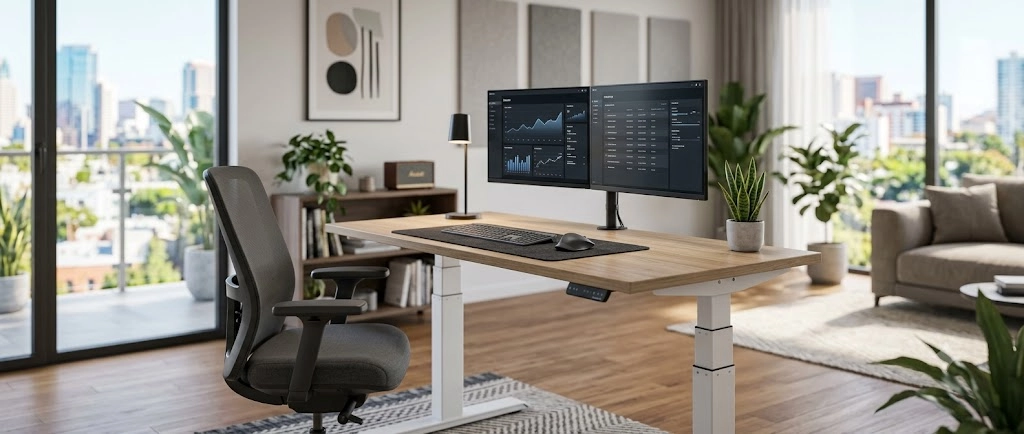
A motorized height adjustable table equipped with dual motors offers distinct advantages for professional home setups. Independent motors on each leg frame raise heavy setups—such as dual monitors, cpu towers, and studio speakers—without stutters or wobbles. Digital memory controllers allow you to save precise sitting and standing heights with a single button press.
3. Designing an Ergonomic Home Office Setup in India
To get the most out of a sit stand desk in India, position your workstation correctly to protect your neck, shoulders, and wrists.
Step-by-Step Ergonomic Setup Checklist:
- Determine Seated Elbow Height: Adjust your chair so your feet rest flat on the floor. Lower the desk surface until your forearms rest parallel to the floor with your elbows bent at a 90-degree angle.
- Set Standing Height: Raise the table until your forearms rest naturally on the tabletop without hunching your shoulders.
- Align Monitor Elevation: Position the top third of your computer screen at direct eye level, about an arm’s length away. Use a monitor arm attachment to maintain correct eye alignment whether sitting or standing.
- Organize Cable Bundles: Use flexible cable spine channels and under-desk trays to prevent power cords from catching or pulling tight when the frame raises.
4. Materials and Climate Compatibility for Indian Workspaces
Indian urban environments experience wide humidity shifts between hot, dry summers and rainy monsoon seasons. Choosing durable materials for your hybrid work furniture ensures long-term performance.
Solid hardwoods like seasoned Teak wood or high-density engineered boards treated with Boiling Water Resistant (BWR) resins resist thermal expansion. Material research from the Forest Products Laboratory highlights that properly seasoned timber exhibits minimal swelling under humidity changes, making treated tops ideal for home offices.
For additional interior design recommendations on setting up high-productivity spaces, publications like Architectural Digest India provide design guides tailored to modern apartments.
Frequently Asked Questions (FAQ)
What is an adjustable office table?
An adjustable office table—also called a sit-stand desk—is a desk equipped with a manual crank or electric motor that allows users to adjust the table height, letting them alternate between sitting and standing while working.
How often should I switch between sitting and standing at work?
Ergonomic experts recommend following a 45:15 or 30:15 ratio—sit for 30 to 45 minutes, then stand and work for 15 to 30 minutes. Switching postures regularly prevents muscle fatigue without disrupting workflow.
Why is a motorized height adjustable table better than a manual desk?
Motorized height-adjustable tables raise and lower at the push of a button, often featuring digital memory presets. This smooth mechanism makes height changes effortless, encouraging you to adjust your posture more frequently throughout the day.
Can an adjustable office desk hold multiple heavy monitors?
Yes, high-quality dual-motor adjustable desks support weight loads between 100 kg and 125 kg. This capacity easily supports multiple monitors, heavy desktop mounts, laptop docks, and audio equipment.
How do I maintain an electric sit-stand desk in warm climates?
Keep the electric motor and power adapters away from direct sunlight and damp walls. Periodically check that cable management trays have enough slack so cords move freely during height adjustments.
Conclusion & Next Steps
Adapting to a flexible workplace requires tools that support long-term physical health and daily productivity. Investing in adjustable office tables gives you full control over your working posture, helping reduce spinal strain, boost daily energy, and improve focus across long work hours.
Ready to build your ultimate ergonomic home office? Explore the ergonomic workstation collection at Livoraa Furnishing or contact our workspace specialists today to customize motor-driven desks designed for your home environment.